
A simple and elegant solution to displaying hierarchical tree structures (i.e. a Tree View) while leveraging the best that Twitter Bootstrap has to offer.
注意simple、elegant,簡單而優(yōu)雅,我喜歡這兩個詞。
那么今天的實例是通過Bootstrap Tree View來制作一款省市級菜單的應(yīng)用。
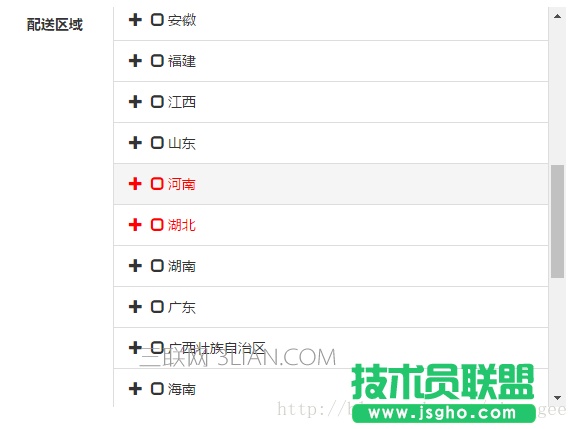
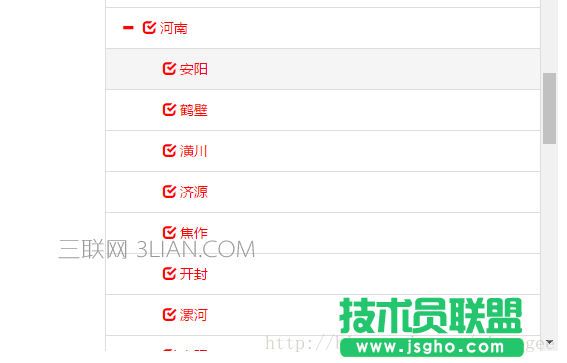
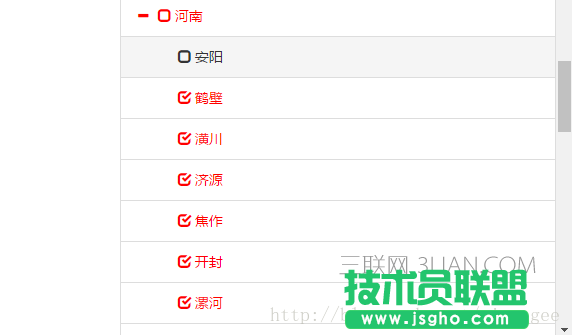
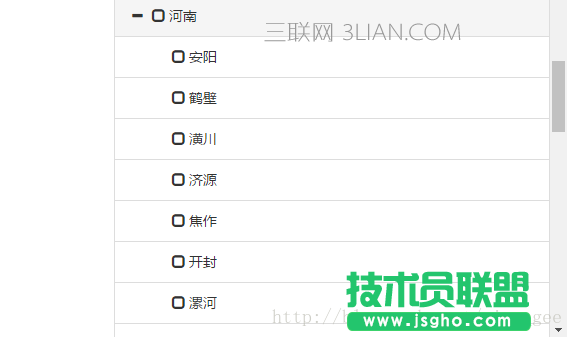
一、效果圖
二、應(yīng)用
①、首先,項目需要引入bootstrap.css、jquery.js、bootstrap-treeview.js
<link type="text/css" rel="stylesheet" href=http://www.3lian.com/edu/2017/06-16/"${ctx}/components/bootstrap/css/bootstrap.min.css" rel="external nofollow" /> <script type="text/javascript" src=http://www.3lian.com/edu/2017/06-16/"${ctx}/components/jquery/jquery-1.10.1.min.js"></script> <script type="text/javascript" src=http://www.3lian.com/edu/2017/06-16/"${ctx}/components/treeview/js/bootstrap-treeview.js"></script>
②、接下來,頁面上需要放一個dom元素。
<div id="procitytree" style="height: 400px;overflow-y :scroll;"></div>
通過設(shè)置height和overflow-y,使treeview能夠在垂直方向上出現(xiàn)滾動條。
③、由于省市級數(shù)據(jù)一般都是固定不變的,那么頁面初次加載時,我們把省市級數(shù)據(jù)先拿到。
Java端非常簡單:
@RequestMapping(value = "loadProcitysInfo") public void loadProcitysInfo(HttpServletResponse response) { logger.debug("獲取所有省市"); try { List<Provincial> provincials = provincialService.getProvincials(); for (Provincial provincial : provincials) { List<City> citys = cityService.getCitysByProvincialId(provincial.getId()); provincial.setCitys(citys); } renderJsonDone(response, provincials); } catch (Exception e) { logger.error(e.getMessage(), e); logger.error(e.getMessage()); renderJsonError(response, Constants.SERVER_ERROR); } }
這段代碼需要優(yōu)化,通過mybatis其實可以一次就獲得省級和市級的集合。
獲取數(shù)據(jù)后,通過json寫入到response中。
protected void renderJsonDone(HttpServletResponse response, final Object value) { Map<String, Object> map = new HashMap<String, Object>(); map.put("statusCode", 200); map.put("result", value); String jsonText = JSON.toJSONString(map); PrintWriter writer = null; try { response.setHeader("Pragma", "no-cache"); response.setHeader("Cache-Control", "no-cache"); response.setDateHeader("Expires", 0); response.setContentType(contentType); writer = response.getWriter(); writer.write(jsonText); writer.flush(); } catch (IOException e) { throw new OrderException(e.getMessage()); } finally { if (writer != null) writer.close(); } }
前端通過ajax對數(shù)據(jù)進(jìn)行組裝保存。
jQuery.ajax({ url : common.ctx + "/procity/loadProcitysInfo", // 請求的URL dataType : 'json', async : false, timeout : 50000, cache : false, success : function(response) { var json = YUNM.jsonEval(response); if (json[YUNM.keys.statusCode] == YUNM.statusCode.ok) { var records = json[YUNM.keys.result]; if (!json) return; // 城市列表都存在 if (records != null && records.length > 0) { // 遍歷子節(jié)點 $.each(records, function(index, value) { var proNode = {}; // text是顯示的內(nèi)容 proNode["text"] = value.proname; proNode["id"] = value.id; proNode["procode"] = value.procode; // 節(jié)點不可選中 proNode["selectable"] = false; // 初始化市級節(jié)點 proNode["nodes"] = []; $.each(value.citys, function(index, value) { var cityNode = {}; cityNode["text"] = value.cname; cityNode["id"] = value.id; cityNode["proid"] = value.proid; cityNode["code"] = value.code; // 節(jié)點不可選中 cityNode["selectable"] = false; proNode["nodes"].push(cityNode); }); // 保存頁面端對象中 //YUNM._set.procityTreeData的數(shù)據(jù)結(jié)構(gòu)就是二維數(shù)組。 YUNM._set.procityTreeData.push(proNode); }); } } } });
④、拿到數(shù)據(jù)之后,就可以對treeview進(jìn)行初始化了。
這里,我們講一點更復(fù)雜的應(yīng)用,如下圖。
如果用戶已經(jīng)保存過一部分節(jié)點,那么初次展示的時候就需要通過treeview展示出來了。
我們定一些規(guī)則:
節(jié)點全部選中時color為red,check框選中。
節(jié)點未全部選中時color為red,check框未選中。
節(jié)點一個也沒選中時color為默認(rèn),check框未選中。
為此,我們需要增加一點css。
/* 樹形省市 */ .treeview .list-group-item.node-checked { color: red; } .treeview .list-group-item.node-selected { color: red; }
有了這個規(guī)則,我們在初次展開treeview的時候,就需要重新制定以下數(shù)據(jù)規(guī)則。